Deploying the Query Analyzer Monitor Script
Objective:
This guide outlines the manual steps for the Operations team to deploy the query_analyser_monitor.sh script to a production server and configure its automated daily schedule. This process does not require Git access.
Prerequisites
- /opt/queryanalyzer/src/query_analyzer.py script should be available on server
- Root access to the production server.
- The
sendmailutility must be installed and available at/usr/sbin/sendmail(required for sending email alerts).
Step 1: Create the Monitoring Directory
First, ensure the directory exists on the server where the script will reside. Run the following command:
mkdir -p /opt/queryanalyzer/monitoring_script/Step 2: Create the Script File
Open a new file using your preferred text editor (such as vi or nano):
vib /opt/queryanalyzer/monitoring_script/query_analyser_monitor.sh
Copy the content from the attached shell script: query_analyser_monitor.sh
Step 3: Set Executable Permissions
The script requires execute permissions to run properly. Apply them with this command:
chmod +x /opt/queryanalyzer/monitoring_script/query_analyser_monitor.shStep 4: Configure the Automated Schedule (Cron)
The script must be scheduled to run once a day at 9:00 AM.
Open the crontab for editing:
crontab -l
crontab -e
Add the following line to the bottom of the file.
Note: This command deliberately logs the daily output to a dated file in /tmp/ so it can be easily audited later without consuming permanent disk space.
0 9 * * * /opt/queryanalyzer/monitoring_script/query_analyser_monitor.sh > /tmp/query_analyzer_monitor_$(date +\%F).log 2>&1Save the crontab and exit. The deployment is now complete and the script will automatically monitor the cluster every morning!
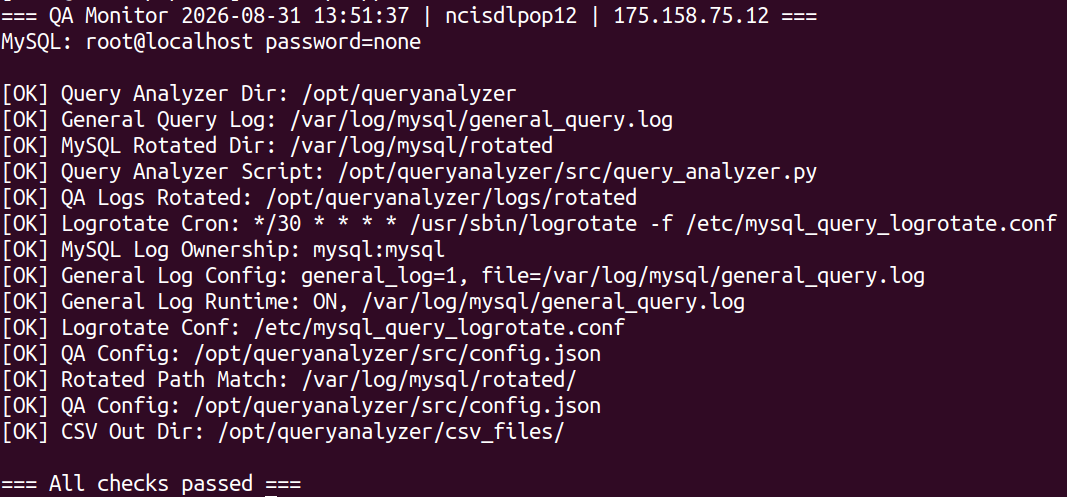
If everything is correct then you can get output like this (output may vary based on server host/ip)
bash /opt/queryanaylyzer
Was this article helpful?
That’s Great!
Thank you for your feedback
Sorry! We couldn't be helpful
Thank you for your feedback
Feedback sent
We appreciate your effort and will try to fix the article